While I was building my portfolio, I got tired of the same boring loop every time I wanted to update my resume:
- Edit the Google Doc.
- Export to PDF.
- Replace the old file in my repo.
- Commit, push, and redeploy.
That is four or five steps just to fix one typo. I thought, there has to be a way where saving a Google Doc just updates my live site automatically. No extra work from me.
The Solution: A Bridge API
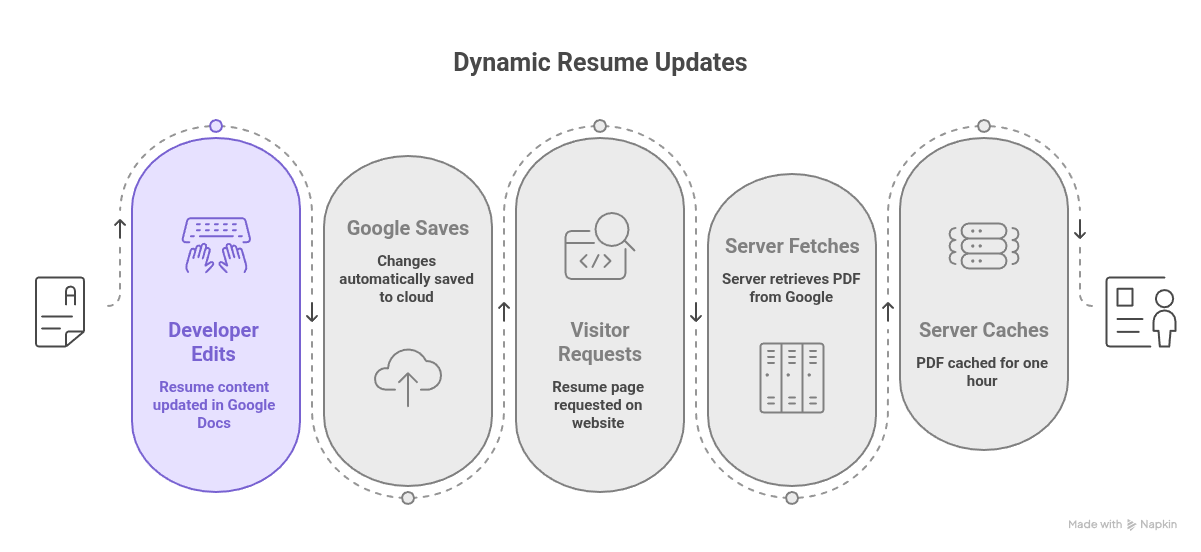
I added an API route inside my Next.js app at src/app/api/resume/route.ts. This route reads a GOOGLE_DOC_ID from my .env file. That ID never leaves my server. When someone visits my resume page, the server builds a special Google URL:
https://docs.google.com/document/d/{DOC_ID}/export?format=pdf
Then my server calls that URL. Google sends back the latest PDF version of my document. My server streams that PDF straight to the browser with the right headers like Content-Type: application/pdf.
Performance & Caching
I did not want to hit Google on every single request. That would be slow and wasteful. So I added a simple cache that stores the PDF in memory for one hour.
After that hour, the next request fetches a fresh copy from Google. This means any change I make in my Google Doc shows up on my portfolio within sixty minutes max. Zero deployments. Zero manual steps.
What about security?
My Google Doc is shared as "Anyone with the link can view." Only my personal Google account can edit it. So even if someone finds the link, they can only read it. No changing anything.
The document ID lives inside my .env file on the server. It never appears in the HTML, network logs, or client-side JavaScript. A visitor only sees a request to myportfolio.com/api/resume. They never see the real Google Docs URL. Guessing a 44-character random ID is basically impossible.
The only real risk is if I accidentally expose my .env file. So I keep it in .gitignore and never push it to GitHub.
The Bottom Line
I edit one Google Doc. My portfolio serves the latest PDF automatically. No exports, no uploads, no rebuilds. Google Docs turned into a super lightweight headless CMS for my resume.